错误处理
了解如何显示预期错误并处理未捕获的异常。
错误可以分为两大类:预期错误和未捕获的异常。本页将引导你在 Next.js 应用程序中如何处理这些错误。
处理预期错误
预期错误是指在应用程序正常运行过程中可能发生的错误,例如来自服务器端表单验证或失败的请求的错误。这些错误应被显式处理并返回给客户端。
服务器函数
你可以使用 useActionState Hook 在服务器函数中处理预期错误。
对于这些错误,请避免使用 try/catch 块并抛出错误。相反,应将预期错误建模为返回值。
TypeScript
'use server'

export async function createPost(prevState: any, formData: FormData) {
  const title = formData.get('title')
  const content = formData.get('content')

  const res = await fetch('https://api.vercel.app/posts', {
    method: 'POST',
    body: { title, content },
  })
  const json = await res.json()

  if (!res.ok) {
    return { message: 'Failed to create post' }
  }
}
JavaScript
'use server'

export async function createPost(prevState, formData) {
  const title = formData.get('title')
  const content = formData.get('content')

  const res = await fetch('https://api.vercel.app/posts', {
    method: 'POST',
    body: { title, content },
  })
  const json = await res.json()

  if (!res.ok) {
    return { message: 'Failed to create post' }
  }
}
你可以将 action 传递给 useActionState Hook,并使用返回的 state 来显示错误消息。
TypeScript
'use client'

import { useActionState } from 'react'
import { createPost } from '@/app/actions'

const initialState = {
  message: '',
}

export function Form() {
  const [state, formAction, pending] = useActionState(createPost, initialState)

  return (
    <form action={formAction}>
      <label htmlFor="title">Title</label>
      <input type="text" id="title" name="title" required />
      <label htmlFor="content">Content</label>
      <textarea id="content" name="content" required />
      {state?.message && <p aria-live="polite">{state.message}</p>}
      <button disabled={pending}>Create Post</button>
    </form>
  )
}
JavaScript
'use client'

import { useActionState } from 'react'
import { createPost } from '@/app/actions'

const initialState = {
  message: '',
}

export function Form() {
  const [state, formAction, pending] = useActionState(createPost, initialState)

  return (
    <form action={formAction}>
      <label htmlFor="title">Title</label>
      <input type="text" id="title" name="title" required />
      <label htmlFor="content">Content</label>
      <textarea id="content" name="content" required />
      {state?.message && <p aria-live="polite">{state.message}</p>}
      <button disabled={pending}>Create Post</button>
    </form>
  )
}
服务器组件
在服务器组件内部获取数据时,你可以利用响应来有条件地渲染错误消息或 redirect。
TypeScript
export default async function Page() {
  const res = await fetch(`https://...`)
  const data = await res.json()

  if (!res.ok) {
    return 'There was an error.'
  }

  return '...'
}
JavaScript
export default async function Page() {
  const res = await fetch(`https://...`)
  const data = await res.json()

  if (!res.ok) {
    return 'There was an error.'
  }

  return '...'
}
未找到
你可以在路由段中调用 notFound 函数,并使用 not-found.js 文件来显示 404 UI。
TypeScript
import { notFound } from 'next/navigation'
import { getPostBySlug } from '@/lib/posts'

export default async function Page({
  params,
}: {
  params: Promise<{ slug: string }>
}) {
  const { slug } = await params
  const post = getPostBySlug(slug)

  if (!post) {
    notFound()
  }

  return <div>{post.title}</div>
}
export default function NotFound() {
  return <div>404 - Page Not Found</div>
}
JavaScript
import { notFound } from 'next/navigation'
import { getPostBySlug } from '@/lib/posts'

export default async function Page({ params }) {
  const { slug } = await params
  const post = getPostBySlug(slug)

  if (!post) {
    notFound()
  }

  return <div>{post.title}</div>
}
export default function NotFound() {
  return <div>404 - Page Not Found</div>
}
处理未捕获的异常
未捕获的异常属于意外错误,表明存在应用程序正常流程中不应出现的 bug 或问题。这类异常应通过抛出错误来处理,随后会被错误边界捕获。
嵌套错误边界
Next.js 使用错误边界来处理未捕获的异常。错误边界会在其子组件中捕获错误,并显示回退 UI,而不是显示已崩溃的组件树。
通过在路由段内添加 error.js 文件并导出 React 组件来创建错误边界:
TypeScript
'use client' // Error boundaries must be Client Components

import { useEffect } from 'react'

export default function ErrorPage({
  error,
  retry,
}: {
  error: unknown
  retry: () => void
}) {
  useEffect(() => {
    // Log the error to an error reporting service
    console.error(error)
  }, [error])

  return (
    <div>
      <h2>Something went wrong!</h2>
      <button
        onClick={
          // Attempt to recover by re-fetching and re-rendering the segment
          () => retry()
        }
      >
        Try again
      </button>
    </div>
  )
}
JavaScript
'use client' // Error boundaries must be Client Components

import { useEffect } from 'react'

export default function ErrorPage({ error, retry }) {
  useEffect(() => {
    // Log the error to an error reporting service
    console.error(error)
  }, [error])

  return (
    <div>
      <h2>Something went wrong!</h2>
      <button
        onClick={
          // Attempt to recover by re-fetching and re-rendering the segment
          () => retry()
        }
      >
        Try again
      </button>
    </div>
  )
}
错误会向上冒泡到最近的父级错误边界。通过在路由层级的不同层级放置 error.tsx 文件,可以实现细粒度的错误处理。
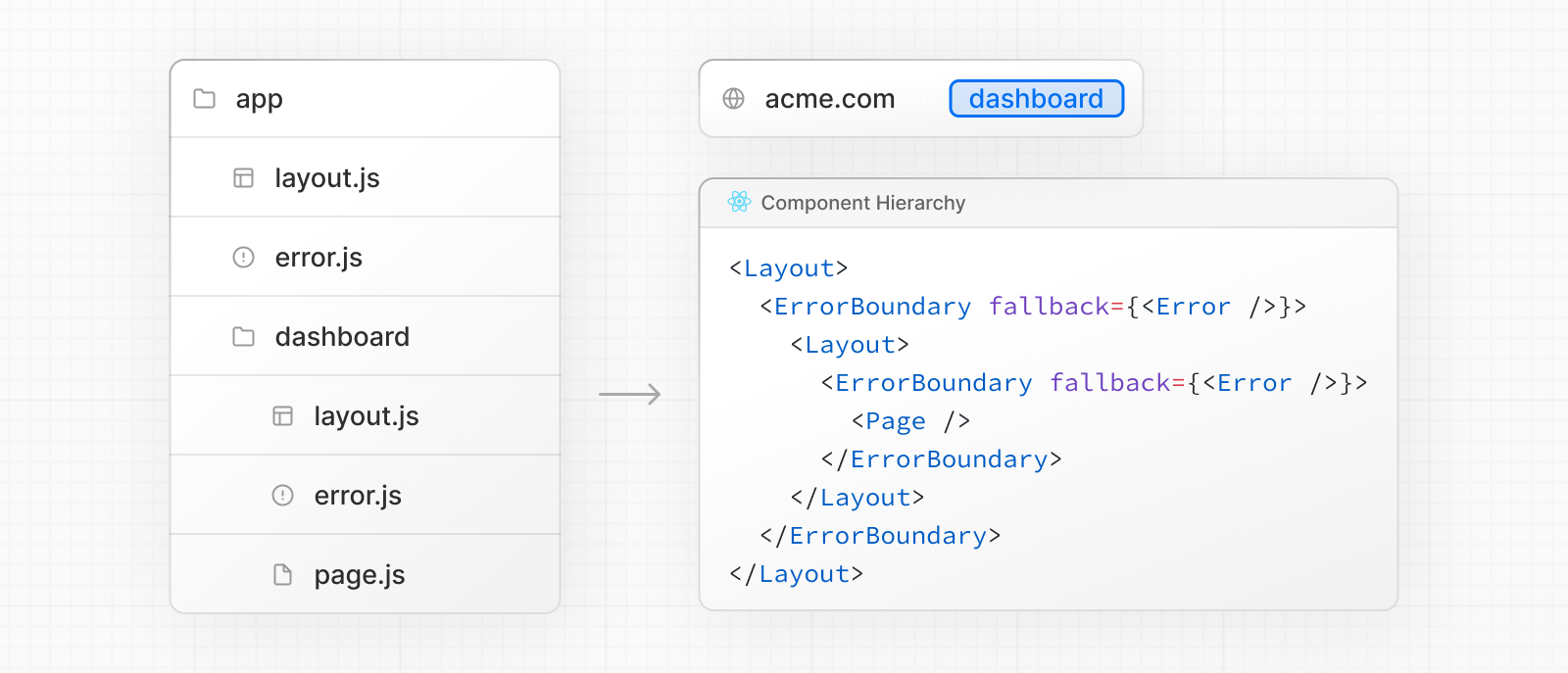
对于组件级错误恢复,catchError 函数允许你创建可以包裹组件树任意部分的错误边界:
TypeScript
'use client'

import { catchError, type ErrorInfo } from 'next/error'

function ErrorFallback(props: { title: string }, { error, retry }: ErrorInfo) {
  const message = error instanceof Error ? error.message : String(error)

  return (
    <div>
      <h2>{props.title}</h2>
      <p>{message}</p>
      <button onClick={() => retry()}>Try again</button>
    </div>
  )
}

export default catchError(ErrorFallback)
JavaScript
'use client'

import { catchError } from 'next/error'

function ErrorFallback(props, { error, retry }) {
  const message = error instanceof Error ? error.message : String(error)

  return (
    <div>
      <h2>{props.title}</h2>
      <p>{message}</p>
      <button onClick={() => retry()}>Try again</button>
    </div>
  )
}

export default catchError(ErrorFallback)
然后,在任何布局或页面中将返回的组件用作包装器:
TypeScript
import ErrorBoundary from './custom-error-boundary'

export default function Component({ children }: { children: React.ReactNode }) {
  return <ErrorBoundary title="Dashboard Error">{children}</ErrorBoundary>
}
JavaScript
import ErrorBoundary from './custom-error-boundary'

export default function Component({ children }) {
  return <ErrorBoundary title="Dashboard Error">{children}</ErrorBoundary>
}
错误边界不会捕获事件处理器内部的错误。它们旨在捕获渲染期间的错误,以显示 回退 UI,而不是让整个应用崩溃。
一般来说,事件处理器或异步代码中的错误不会由错误边界处理,因为它们是在渲染之后运行的。
要处理这些情况,请手动捕获错误,并使用 useState 或 useReducer 存储它,然后更新 UI 以通知用户。
'use client'

import { useState } from 'react'

export function Button() {
  const [error, setError] = useState(null)

  const handleClick = () => {
    try {
      // do some work that might fail
      throw new Error('Exception')
    } catch (reason) {
      setError(reason)
    }
  }

  if (error) {
    /* render fallback UI */
  }

  return (
    <button type="button" onClick={handleClick}>
      Click me
    </button>
  )
}
请注意,来自 useTransition 的 startTransition 内部未处理的错误将向上冒泡到最近的错误边界。
'use client'

import { useTransition } from 'react'

export function Button() {
  const [pending, startTransition] = useTransition()

  const handleClick = () =>
    startTransition(() => {
      throw new Error('Exception')
    })

  return (
    <button type="button" onClick={handleClick}>
      Click me
    </button>
  )
}
全局错误
虽然不太常见,但你可以使用位于根 app 目录中的 global-error.js 文件来处理根布局中的错误,即使在使用国际化时也是如此。全局错误 UI 必须定义自己的 <html> 和 <body> 标签,因为它在激活时会替换根布局或模板。
TypeScript
'use client' // Error boundaries must be Client Components

export default function GlobalError({
  error,
  retry,
}: {
  error: unknown
  retry: () => void
}) {
  return (
    // global-error must include html and body tags
    <html>
      <body>
        <h2>Something went wrong!</h2>
        <button onClick={() => retry()}>Try again</button>
      </body>
    </html>
  )
}
JavaScript
'use client' // Error boundaries must be Client Components

export default function GlobalError({ error, retry }) {
  return (
    // global-error must include html and body tags
    <html>
      <body>
        <h2>Something went wrong!</h2>
        <button onClick={() => retry()}>Try again</button>
      </body>
    </html>
  )
}
API 参考
阅读 API 参考,了解本页提到的功能的更多信息。
- redirect:redirect 函数的 API 参考。
- error.js:error.js 特殊文件的 API 参考。
- catchError:catchError 函数的 API 参考。
- notFound:notFound 函数的 API 参考。
- not-found.js:not-found.js 文件的 API 参考。