保持页面静态
在应用发生变化时,保持选定路由的输出为静态。
在 Cache Components 之前,诸如 dynamic = 'force-static'、dynamic = 'force-dynamic' 和 dynamic = 'error' 之类的路由段配置会为整个路由选择一种渲染模式。Cache Components 允许一个路由组合预渲染的 UI、缓存的内容,以及在请求时渲染的请求特定内容。
这种灵活性对于需要个性化的路由很有用。当路由的某些部分或全部必须避免在请求时进行服务器渲染,以获得可预期的性能和计算成本时,请使用 ensureStatic。
决定哪些内容应保持静态
静态输出不依赖于请求特定的数据。Next.js 可以在请求之前生成它,并在多个请求之间复用它。
借助 Partial Prefetching,路由输出会在三个导航阶段中变得可用:
- 默认的
<Link>会加载 App Shell。 <Link prefetch={true}>还可以加载该链接 URL 的内容。- 导航会渲染点击之后仍然剩余的任何内容。
每个 ensureStatic 级别都会通过这些阶段之一来扩展静态要求。在下图中,灰色表示静态输出,蓝色表示可以在请求时渲染的内容:
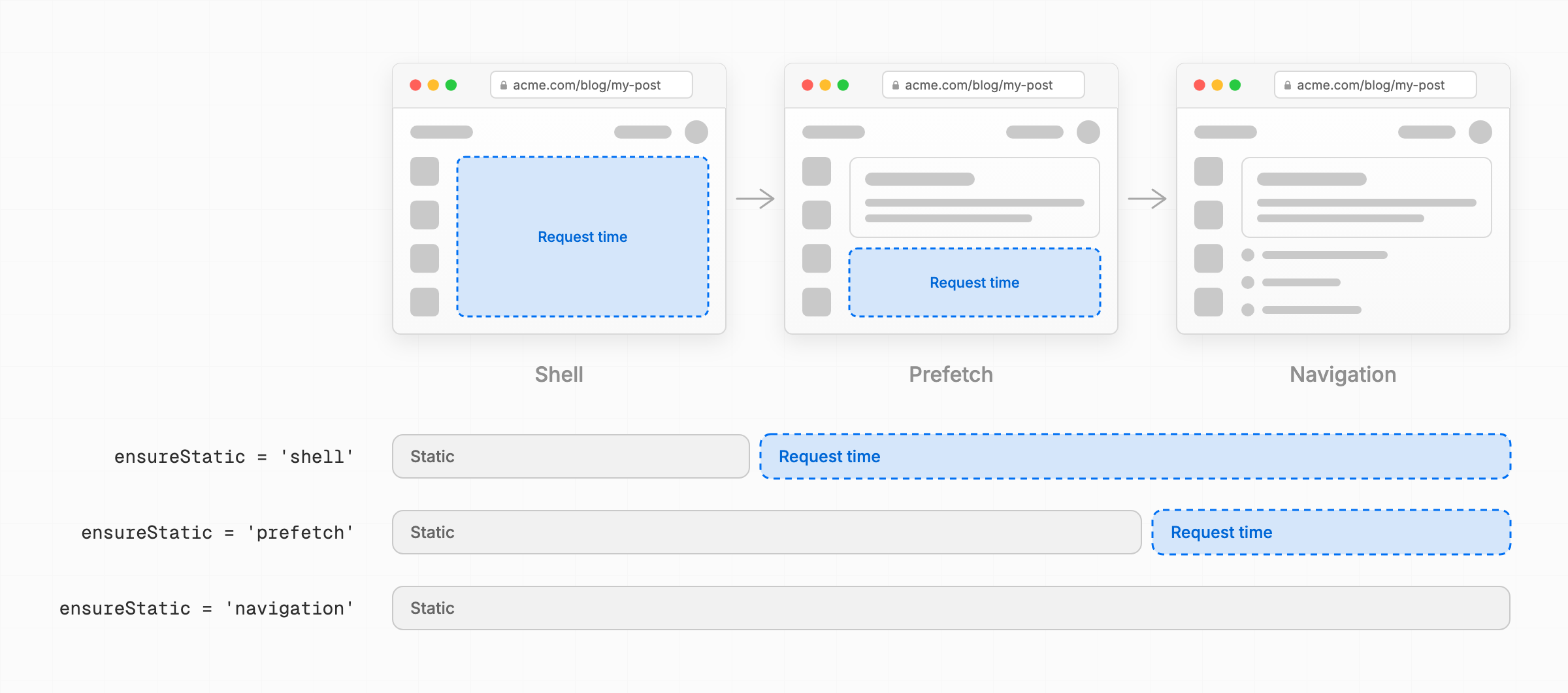
根据哪个请求必须仅使用静态输出来选择级别:
'shell':由默认<Link>加载的 App Shell。'prefetch':App Shell 以及来自<Link prefetch={true}>的逐链接预取,其中可以包含该链接 URL 数据的内容,例如params。'navigation':完整路由,包括用户导航后返回的响应。
示例
以下示例为在线商店的三个部分添加了静态要求:共享购物车、产品页面和公开购买指南。
app/
├── store/
│   ├── layout.tsx         # Shared layout with the cart
│   ├── page.tsx           # Product catalog
│   └── products/
│       └── [slug]/
│           └── page.tsx   # Product details and cart status
├── guides/
│   └── [id]/
│       └── page.tsx       # Editorial buying guides
└── ui/
    ├── cart.tsx
    └── product.tsx
lib/
└── guides.ts
启用 Cache Components 和 Partial Prefetching:
import type { NextConfig } from 'next'

const nextConfig: NextConfig = {
  cacheComponents: true,
  partialPrefetching: true,
}

export default nextConfig
第 1 步:加载静态 App Shell
共享商店布局会显示访客的购物车数量。CartButton 会在服务器上从 cookie 读取该数量:
import { cookies } from 'next/headers'

export async function CartButton() {
  const value = Number((await cookies()).get('cart-count')?.value ?? 0)
  return <button>Cart ({value})</button>
}
该布局将 CartButton 放在 <Suspense> 内,后者在渲染当前数量时提供静态回退内容:
import Link from 'next/link'
import { Suspense } from 'react'
import { CartButton } from '@/app/ui/cart'

export default function StoreLayout({ children }: LayoutProps<'/store'>) {
  return (
    <>
      <nav>
        <Link href="/store">Products</Link>
        <Link href="/guides">Buying guides</Link>
        <Suspense fallback={<button>Cart (0)</button>}>
          <CartButton />
        </Suspense>
      </nav>
      <main>{children}</main>
    </>
  )
}
导航和购物车回退内容在所有访客之间共享。加载指向商店的链接时,不应在用户点击之前于服务器上渲染个性化购物车数量。添加 ensureStatic = 'shell',使默认的 <Link> 仅请求静态 App Shell:
import Link from 'next/link'
import { Suspense } from 'react'
import { CartButton } from '@/app/ui/cart'

export const ensureStatic = 'shell'

export default function StoreLayout({ children }: LayoutProps<'/store'>) {
  // ...
}
现在,进入商店的默认 <Link> 会从静态输出加载导航和 Cart (0) 回退内容。在后续的逐链接预取或导航请求它之前,服务器不会渲染当前购物车数量。这避免了为用户可能永远不会点击的链接进行请求时的服务器端工作。
须知:
如果只需要将
CartButton从 App Shell 中延迟,你可以在该子树内调用await prefetch()。但这里的需求适用于整个商店外壳,包括未来的改动,因此布局使用了ensureStatic = 'shell'。
第 2 步:预取静态商品详情
每个商品页面都将可在访客之间复用的详情,与依赖当前访客的购物车操作结合在一起。ProductDetails 使用 use cache 缓存它的查询,而 ProductCartStatus 读取 cookie 来检查该商品是否已在购物车中:
import { cookies } from 'next/headers'
import { db } from '@/lib/db'

type Params = Promise<{ slug: string }>

export async function ProductDetails({ params }: { params: Params }) {
  const { slug } = await params
  const product = await getProduct(slug)
  return <h1>{product.name}</h1>
}

export async function ProductCartStatus({ params }: { params: Params }) {
  const { slug } = await params
  const cart = (await cookies()).get('cart')?.value?.split(',') ?? []
  return (
    <button>{cart.includes(slug) ? 'Remove from cart' : 'Add to cart'}</button>
  )
}

async function getProduct(slug: string) {
  'use cache'
  return db.product.findUniqueOrThrow({ where: { slug } })
}
商品路由使用 generateStaticParams() 预渲染目录中的商品 URL。独立的 <Suspense> 边界让商品详情能够以静态购物车回退内容渲染:
import { Suspense } from 'react'
import { ProductCartStatus, ProductDetails } from '@/app/ui/product'

export function generateStaticParams() {
  return [{ slug: 'coffee-grinder' }]
}

export default function ProductPage({
  params,
}: PageProps<'/store/products/[slug]'>) {
  return (
    <>
      <Suspense fallback={<p>Loading product...</p>}>
        <ProductDetails params={params} />
      </Suspense>
      <Suspense fallback={<button>Add to cart</button>}>
        <ProductCartStatus params={params} />
      </Suspense>
    </>
  )
}
默认的商品链接会加载 App Shell,其中包含商品回退内容。由于商品详情已经预渲染,目录可以通过设置 prefetch={true} 在点击之前就包含它们:
<Link href="/store/products/coffee-grinder" prefetch={true}>
  Coffee grinder
</Link>
每个可见的 prefetch={true} 链接都可能渲染 ProductCartStatus,以便为该商品个性化购物车操作。因此,一个包含 20 个可见商品的网格可能在用户点击商品之前触发 20 次请求时服务器渲染。
添加 ensureStatic = 'prefetch',让每次商品预取只使用静态输出:
import { Suspense } from 'react'
import { ProductCartStatus, ProductDetails } from '@/app/ui/product'

export const ensureStatic = 'prefetch'

export default function ProductPage({
  params,
}: PageProps<'/store/products/[slug]'>) {
  // ...
}
现在每次商品预取都包含已缓存的商品详情和静态的 加入购物车 回退内容,而不会触发请求时服务器渲染。当前购物车状态会在用户访问该链接后渲染。
ensureStatic 的值覆盖整个路由,包括导出它的段之上的布局。在商品路由上,'prefetch' 还能通过按链接预取让商店布局保持静态。
须知:
如果只需要将
ProductCartStatus从按链接预取中延迟,你可以在读取 cookie 之前调用await navigation()。但这里每次商品预取都必须避免请求时服务器渲染,因此页面使用了ensureStatic = 'prefetch'。
第 3 步:预渲染购买指南
商店还有公开的购买指南。每个指南从数据库读取内容,并从 cookie 应用主题:
import { Suspense } from 'react'
import { cookies } from 'next/headers'
import { getGuide } from '@/lib/guides'

export default function GuidePage({ params }: PageProps<'/guides/[id]'>) {
  return (
    <Suspense fallback={<p>Loading guide...</p>}>
      <Guide params={params} />
    </Suspense>
  )
}

async function Guide({ params }: { params: Promise<{ id: string }> }) {
  const { id } = await params
  const guide = await getGuide(id)
  const theme = (await cookies()).get('theme')?.value
  return <article data-theme={theme}>{guide.content}</article>
}
现有的 getGuide() 辅助函数执行数据库查询:
import { db } from '@/lib/db'

export async function getGuide(id: string) {
  return db.guide.findUniqueOrThrow({ where: { id } })
}
目前,next build 为商店路由和购买指南生成部分预渲染:
Route (app)
├   /guides/[id]
│ └ ◐ /guides/[id]
├ ◐ /store
└   /store/products/[slug]
  ├ ◐ /store/products/[slug]
  └ ◐ /store/products/coffee-grinder

◐  (Partial Prerender)  prerendered as static HTML with dynamic server-streamed content
商店和商品路由出现部分输出是预期之内的,因为它们针对具体请求的购物车 UI 会在之后渲染。购买指南是公开的编辑类页面,因此它们应返回完整的静态输出,而不进行请求时服务器渲染。添加 ensureStatic = 'navigation':
  import { Suspense } from 'react'
  import { cookies } from 'next/headers'

+ export const ensureStatic = 'navigation'

  export default function GuidePage({ params }) {
    // ...
  }
再次运行 next build 时,Next.js 首先会报告该动态路由没有提供任何可供预渲染的参数值:
Error: Page "/guides/[id]": `ensureStatic = "navigation"` requires an exported `generateStaticParams()` function.
Learn more: https://nextjs.org/docs/messages/generate-static-params#with-ensurestatic
    at ignore-listed frames
> Build error occurred
Error: Failed to collect page data for /guides/[id]
导出 generateStaticParams() 并返回至少一个购买指南 ID。Next.js 会在构建期间预渲染返回的 ID。它可以在其他允许的 ID 首次请求时生成它们,并为后续请求存储结果。使用 'navigation' 时,该首次请求会等待完整的静态页面,而不是流式返回回退内容。参见 配合 Cache Components 使用 ISR。
添加一个返回要预渲染的指南 ID 的辅助函数:
export async function getGuideIds() {
  const guides = await db.guide.findMany({ select: { id: true } })
  return guides.map(({ id }) => id)
}
import { Suspense } from 'react'
import { cookies } from 'next/headers'
import { getGuide, getGuideIds } from '@/lib/guides'

export const ensureStatic = 'navigation'

export async function generateStaticParams() {
  const ids = await getGuideIds()
  return ids.map((id) => ({ id }))
}

export default function GuidePage({ params }: PageProps<'/guides/[id]'>) {
  return (
    <Suspense fallback={<p>Loading guide...</p>}>
      <Guide params={params} />
    </Suspense>
  )
}

async function Guide({ params }: { params: Promise<{ id: string }> }) {
  const { id } = await params
  const guide = await getGuide(id)
  const theme = (await cookies()).get('theme')?.value
  return <article data-theme={theme}>{guide.content}</article>
}
generateStaticParams() 提供了参数值,但该指南仍包含未缓存且与请求相关的工作。下一次构建会报告该路由无法完全静态化:
Error: Route "/guides/[id]": Next.js encountered uncached or runtime data on a route that must be fully static.

This route is configured to be fully static, but uncached or runtime data prevents it from being fully prerendered.

Ways to fix this:
  - [cache] For uncached data (`fetch`, database calls): cache the access with `"use cache"` (does not apply to `connection()`)
  - [remove] Remove the data access
  - [client] Read the data on the client

Learn more: https://nextjs.org/docs/messages/static-route-dynamic
    at Suspense (<anonymous>)
    at body (<anonymous>)
    at html (<anonymous>)
构建过程会识别出受影响的路由,但它的堆栈帧不包含数据访问的源代码位置。要在修复过程中获得经过源映射的代码帧,请启动 next dev 并打开 /guides/coffee。如果只能运行构建,请使用 next build --debug-prerender。
开发覆盖层首先指向的是未缓存的数据库查询:
return db.guide.findUniqueOrThrow({ where: { id } })
它提供了三种处理未缓存数据的方式:
缓存:缓存数据
async function getData() {
  "use cache"
  return await db.query(…)
移除:移除数据访问
async function Page() {
- await connection()
  return <Content />
客户端:在客户端读取数据
'use client'
const data = useSWR('/api')
return <Content data={data} />
购买指南内容可以在访客之间共享,因此 缓存 修复方案保留了页面的静态要求。将 'use cache' 指令添加到 getGuide(),以便 Next.js 可以复用查询结果:
import { db } from '@/lib/db'

export async function getGuideIds() {
  const guides = await db.guide.findMany({ select: { id: true } })
  return guides.map(({ id }) => id)
}

export async function getGuide(id: string) {
  'use cache'
  return db.guide.findUniqueOrThrow({ where: { id } })
}
查询被缓存后,覆盖层会指向剩余的请求特定值:
const theme = (await cookies()).get('theme')?.value
覆盖层现在会给出针对运行时数据的修复方案:
移除:移除数据访问
async function Page() {
- const store = await cookies()
  return <Content />
客户端:在客户端读取数据
'use client'
use(browser('Read cookie'))
document.cookie.match(/cart=/)
购买指南不需要访客特定的主题,因此移除对 cookie 的访问:
  import { Suspense } from 'react'
- import { cookies } from 'next/headers'
  import { getGuide, getGuideIds } from '@/lib/guides'

  // ...

  async function Guide({ params }) {
    const { id } = await params
    const guide = await getGuide(id)
-   const theme = (await cookies()).get('theme')?.value
-   return <article data-theme={theme}>{guide.content}</article>
+   return <article>{guide.content}</article>
  }
在数据库查询已缓存、请求特定的主题已移除之后,next build 会为所列指南生成完整的静态页面。
Route (app)
├   /guides/[id]
│ ├ ◐ /guides/[id]
│ └ ○ /guides/coffee
├ ◐ /store
└   /store/products/[slug]
  ├ ◐ /store/products/[slug]
  └ ◐ /store/products/coffee-grinder

○  (Static)             prerendered as static content
◐  (Partial Prerender)  prerendered as static HTML with dynamic server-streamed content
所列指南现在已完全预渲染。对于未列出的指南 ID,首个请求会等待 Next.js 生成并存储完整的静态页面。购买指南不再执行请求时的服务器渲染,并且 ensureStatic 会报告将来可能破坏该要求的更改。
该商店现在从静态 App Shell 加载共享导航,在逐链接预取中包含已缓存的产品详情而无需调用服务器,并为购买指南返回完整的静态输出。个性化购物车数据仍会在需要时渲染。
后续步骤
- 优化预取,以控制各个子树何时渲染。
- 确保即时导航,以验证客户端导航进入商店时能立即显示 UI。
- 迁移到 Cache Components,以在现有应用中替换诸如
dynamic = 'force-static'之类的路由级配置。
API 参考
要求整个路由保持静态输出,或推迟某个子树内的工作。
- ensureStatic:使用 ensureStatic 路由段配置,要求所选路由输出保持静态,而不是按请求渲染。
- prefetch:使用 prefetch 函数,将运行时工作推迟到逐链接预取或导航时执行。
- navigation:使用 navigation 函数,将运行时工作推迟到用户导航时执行。